[ Museum History - External links - User messages - SysOp messages ]
| { | RecoveryWhiskers | - | This space for rent! | - | Nerdsnipe me with your cool project! | } |
The magnificent
The incomparable
The correct amount of crazy
JennyFluff
...and her rust(y) piece of magic:=^.^= RecoveryWhiskers =^.^=
Need to image those crusty old floppy disks? RecoveryWhiskers has your back!What is this about?
For several years I've had a couple of Greaseweazles in a box, not really being sure what to do with them. Then, more recently, I got my hands on a bunch of old floppy disks, some of them with some really interesting contents: Interactive UNIX/386, early Microsoft Word betas, driver disks that are unlikely to exist on archive.org, and a number of other things. Add that to the disks I've already had laying around for a long time, like Banyan VINES, SCO UNIX, etc., and the need for a good imaging tool became .. pressing.
I'm obviously not the only one with this hobby, but some don't sit around waiting for the right tools to show up: They make their own. Such is the case with JennyFluff and their RecoveryWhiskers. Since it readily works on *BSDs, including both NetBSD and FreeBSD (my own modern OSes of choice), I just had to give it a go.
Shut up already! Show me the goods!
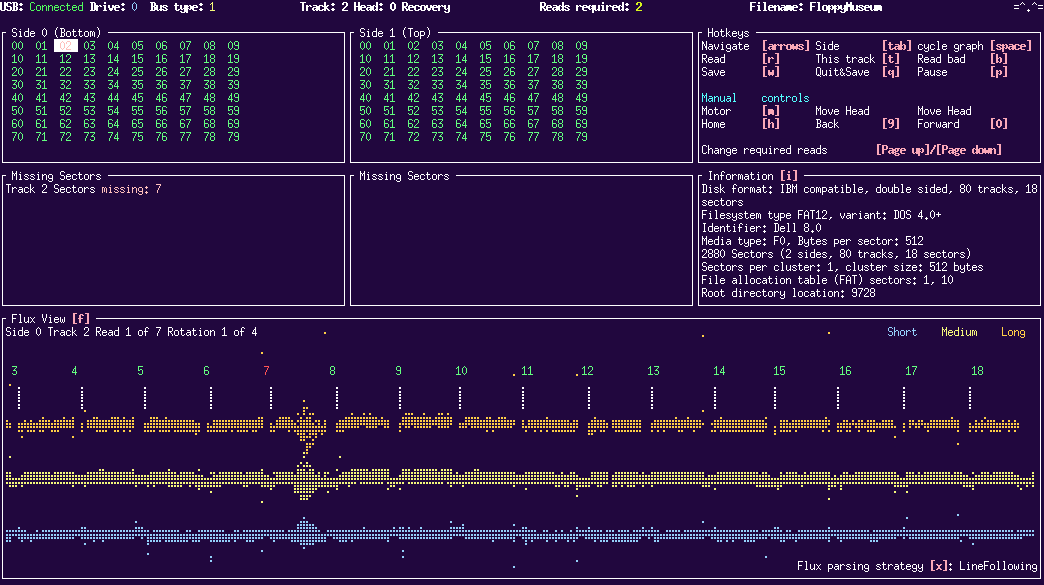
Below is a lo-res image of the text-mode UI; you can click the various parts of it to jump to the corresponding paragraph on this page, or you can simply scroll further down. You can also go here for a higher-resolution image showing it off in all its HiDPI glory.
|
The bits and pieces
Status and drive selection
RecoveryWhiskers supports both IBM PC and Shugart bus types, and as many floppy drives as either bus supports. Use D to switch drive number and U to pick bus type. For my own experiments involving a TEAC twin drive (90mm and 5.25" drives in one unit), I have to use bus type 1 (IBM PC) for the first drive and bus type 2 (Shugart) for the second. This is probably my fault for not wiring it up correctly - but it works.
Next up is the current drive head position and which head is currently active - whether it is actively reading, paused or manually positioned.
You can also adjust how many successful reads RecoveryWhiskers wants of any sector before it is satisfied the read is good.
Hotkeys
Unlike certain other CLI tools, RecoveryWhiskers has a really helpful overview of hotkeys right in the main display. It took me like 20 seconds to understand how to navigate and use the software.
Disk information
As soon as RecoveryWhiskers has read the first track, it should be able to figure out what type of disk you're imaging. If this area remains empty, it means track 1 isn't fully read, or that the floppy format is unknown. This museum's 2M-formatted floppies are among the latter..
Status for each track and side
This part is where the suspense is built while reading that important but possibly fungus-ridden floppy. Watch as each number shows up; if it's green, all is good. Blue-ish indicates a partial read, while red indicates .. well, bad news. But don't fret - let it do a few passes back and forth, and the situation might just improve!
...or get worse, as I found when a disk got scraped badly while reading, resulting in a transparent disc by the time I gave up..
The "bad news" section
If RecoveryWhiskers can't read a track or sector, the failed or marginal ones will be listed here. Again it can be a fascinating - if nerve-wrecking - exercise to read problematic disks and watching these parts: If things suddenly start looking worse rather than better, it's time to stop trying lest you make things worse.
Pretty graphs
Finally, at the bottom, the best part: The flux graph. This is a visualization of the data received from the Greaseweazle, and it can give you an idea of how badly damaged a disk is, or how marginal some of the data might be. There are several flux parsing algorithms available, you can switch between them by hitting X.
How I'm using it
What good is a tool without a proper workflow, though? Having nothing better to do with my evenings, I've hacked together a bsddialog-driven script for easy imaging of disks and disk sets. Take a look at this:
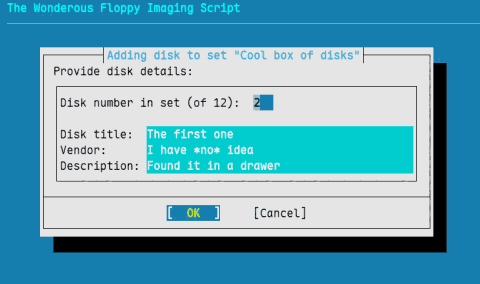 |
Here I've already created a disk set, with the set title in the dialog title, and am entering data for disk 2 of 12. This dialog collects the main metadata for the disk. If I'm just imaging a single disk, it looks pretty much the same. |
| This dialog lets me enter more detailed info about the disk contents, typically whatever might be written on the label beyond the basics. | 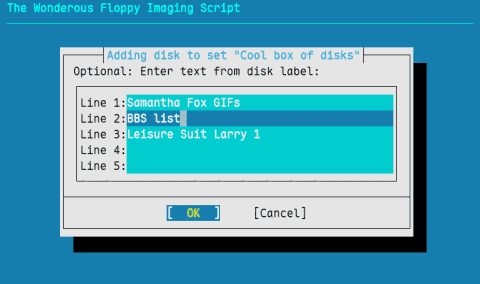 |
Note: This page hand-coded and optimized for Netscape Navigator 2.02 for OS/2. Also viewable in IBM WebExplorer 1.1h. May be compatible with newer user agents.
[ Museum History - External links - User messages - SysOp messages ]
( top - about - config - maintenance - irc - message boards - hardware - software - contact )